ONU page➧
Overview
The ONU page is the main tool of support staff and installers: status and disconnect reasons, signal levels, subscriber ports, MAC addresses behind the ONU, counters and ONU actions (reboot, disable, delete). It opens from the ONTs tree, search, the ONU list or links in events.
Components
Viewing — OLTs (olts); action buttons, description, UNI ports — OLTs control (olts_control); charts — Charts, Live traffic; FDB history — FDB history; macros — Macros.
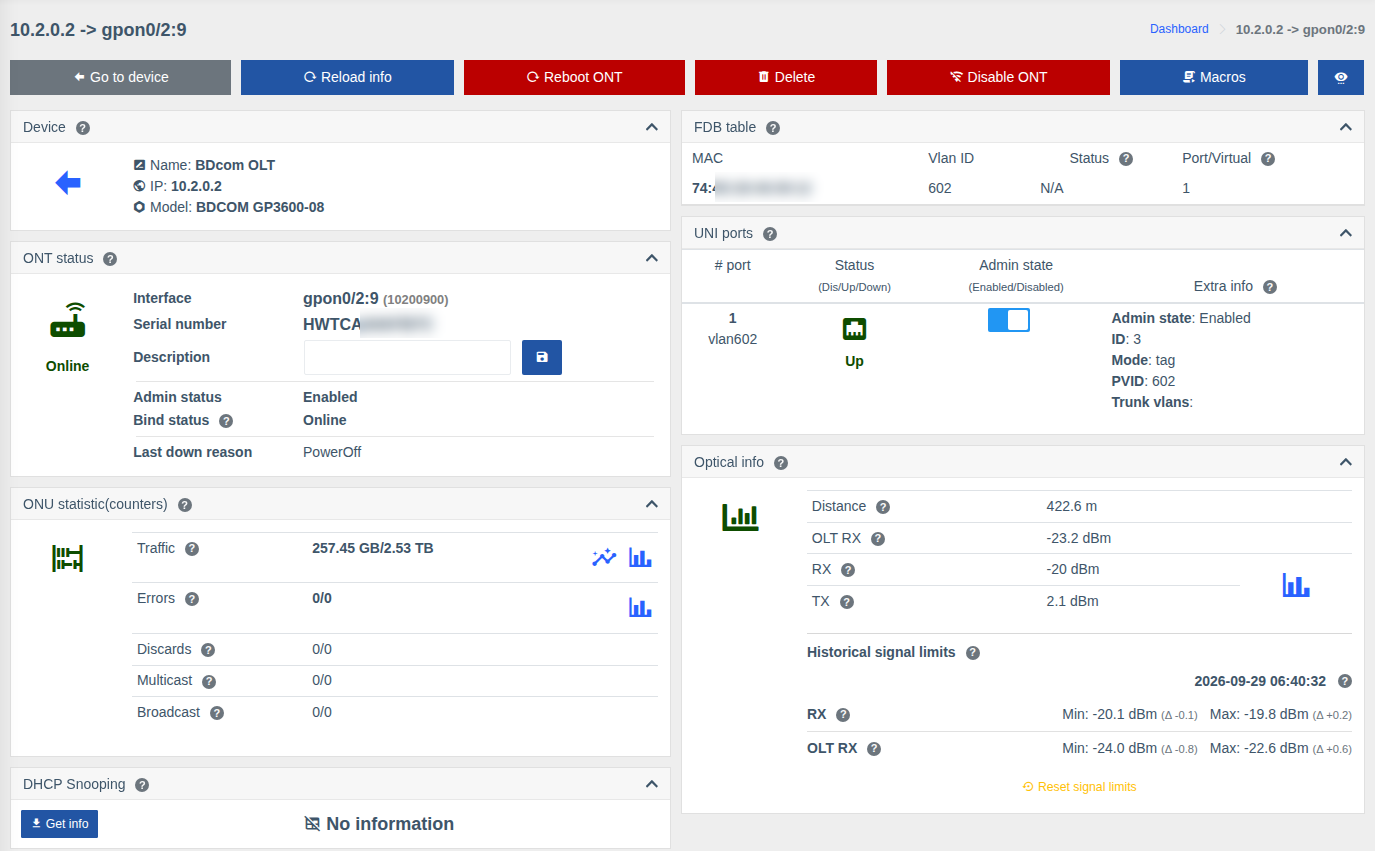
The set of cards and actions depends on the OLT and ONU model. Unneeded cards can be hidden — see Hide unneeded cards.
Action buttons➧
| Button | Action | Permission |
|---|---|---|
| Go to device | Back to the OLT page | — |
| Refresh | Request fresh data from the OLT | — |
| Reboot ONT | Reboot the ONU (with confirmation) | Allow reboot ONT |
| Delete | Delete the ONU from the OLT (deregister) | Allow dereg ONT |
| Reset | Reset ONU settings | Allow reset ONT |
| Disable ONT / Enable ONU | Administratively disable or enable the ONU | Allow disable/enable ONT |
| Macros | Run a macro for this ONU | List and execute macros |
| Eye icon | Manage cards | — |
A button is shown only if the model supports the action, the OLT control component is enabled and you have the corresponding permission.
Cards➧
ONT status➧
| Field | Description |
|---|---|
| Interface | ONU name on the OLT (e.g. gpon0/2:9) and internal ID |
| Serial number / MAC address | ONU identifier (GPON — serial number, EPON — MAC) |
| Description | ONU description on the OLT — can be changed and saved right here ("Allow change ONT description" permission) |
| Admin status | Enabled / Disabled — whether the ONU is administratively enabled |
| Bind status | Physical state: Online, Offline, LOS (loss of signal — fiber problem), PowerOff (power off at the subscriber) |
| Configuration status | Whether the ONU configuration is applied on the OLT |
| Last down reason | Why the ONU disconnected last time |
| Last registration / deregistration, Online since / Offline since | When the ONU registered/disconnected and how long it has been in the current state (depends on the model) |
Optical info➧
- Distance from the OLT to the ONU;
- RX — signal the ONU sees from the OLT; TX — signal transmitted by the ONU;
- OLT RX — signal from the ONU seen by the OLT;
- ONU temperature and voltage (if the model reports them);
- chart icon — signal level history for a period;
- Historical signal limits — min and max since the reset, see ONU signal level history.
If the ONU is offline, current levels can't be retrieved — see the history chart and historical limits.
ONU statistic (counters)➧
Traffic, errors, discards, multicast and broadcast to and from the subscriber. Icons next to traffic — chart for a period and live chart (updated every few seconds); next to errors — errors chart.
UNI ports➧
The ONU subscriber ports (LAN/POTS):
- Status — Up / Down / Disabled;
- Admin state — a switch to enable/disable the port ("Control UNI ports on ONU" permission);
- Extra info — VLAN mode, PVID, trunk VLANs, speed, duplex, etc. (depends on the model).
FDB table and FDB history➧
MAC addresses behind the ONU now (with VLAN and entry type) and history: when and on which ONU each MAC address was seen. Helps find which subscriber router is connected and whether it moved to another ONU.
Other cards➧
| Card | What it shows |
|---|---|
| Vendor info | Vendor, model, hardware version, firmware versions (active / committed) |
| ONT configuration | Current ONU parameters on the OLT (profiles, VLANs, services — depends on the model) |
| ONT IP host | ONU IP hosts (management/service interfaces): ID, MAC, IP address |
| Down history table | ONU registrations and deregistrations with disconnect reasons |
| DHCP Snooping | MAC/IP bindings behind the ONU — the "Get info" button, see DHCP Snooping |
| Uptime table | Up/Down history with down reasons |
| Device | The OLT the ONU is connected to |
| Common cards | Marks, storage, billing, topology, events, links, coordinates, QR — see Port or ONU page |
Permissions➧
| Action | Permission |
|---|---|
| Viewing the ONU | Info from OLTs |
| Reboot | Allow reboot ONT |
| Delete | Allow dereg ONT |
| Reset settings | Allow reset ONT |
| Enable / disable ONU | Allow disable/enable ONT |
| Change description | Allow change ONT description |
| UNI ports management | Control UNI ports on ONU |
| Clear counters | Allow clear ONT counters |