Device accesses➧
Overview
An access is a set of credentials WildcoreDMS uses to connect to hardware: read and write SNMP communities, console login and password (Telnet/SSH), and, if needed, non-standard ports and timeouts. One access can be used by any number of devices.
Menu: Device management > Accesses.
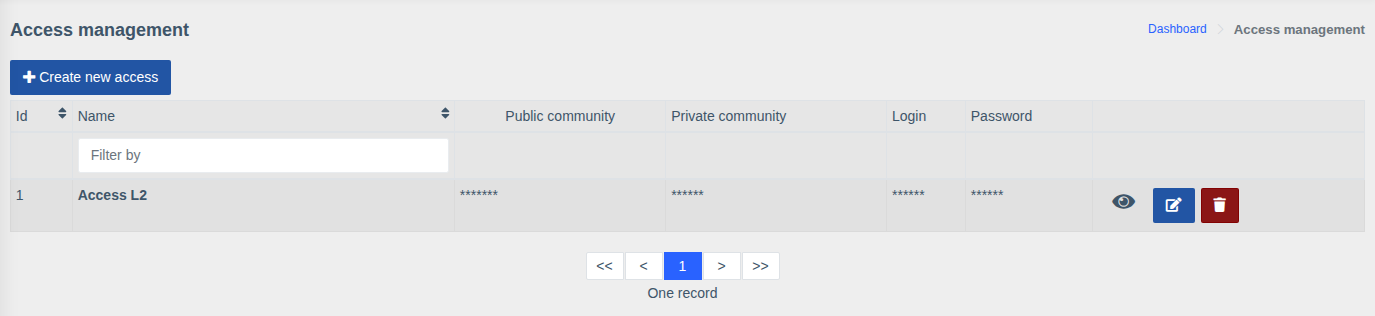
Secret fields are masked in the list. The eye button reveals the values; the buttons on the right edit and delete the access.
Creating and editing➧
Click "Create new access" or the edit button next to an existing one.
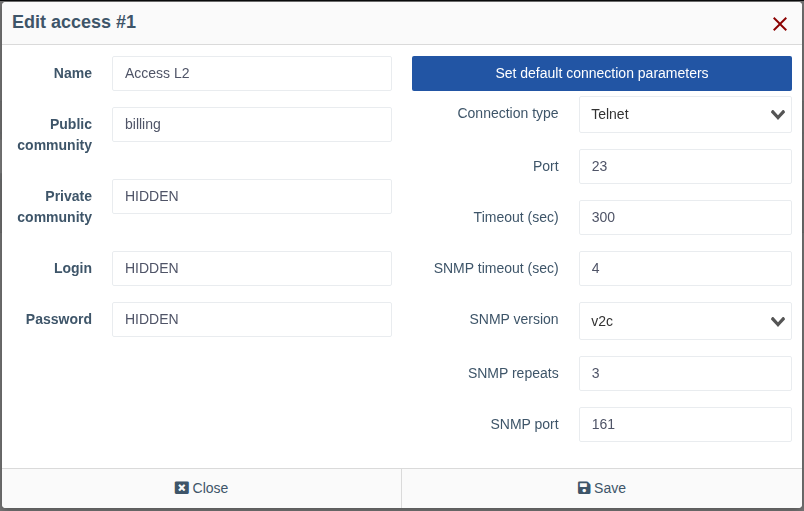
| Field | Description |
|---|---|
| Name | Name shown when choosing an access in the device card, e.g. Access L2 or OLT Huawei |
| RO community | SNMP community for reading (polling, viewing information) |
| RW community | SNMP community for writing — required for SNMP actions (port description, enabling/disabling a port, etc.) |
| Login / Password | Console credentials (Telnet/SSH): used by macros, ONU registration, the web console and modules that work over the console |
Connection parameters➧
By default the system-wide connection parameters are used ("Used default connections parameters"). To set custom ones for this access, click "Set custom connection parameters":
| Field | Description |
|---|---|
| Connection type | Telnet or SSH — console protocol |
| Port | Console port (23 for Telnet, 22 for SSH by default) |
| Timeout (sec) | Maximum execution time of a console command |
| SNMP timeout (sec) | Wait time for a single SNMP request |
| SNMP version | v1 or v2c |
| SNMP repeats | Number of SNMP request retries when there is no response |
| SNMP port | SNMP port (161 by default) |
The "Set default connection parameters" button returns to the system-wide parameters.
Tip
If some hardware is reachable on other ports or responds slowly (e.g. an OLT with many ONUs), create a separate access for it with longer timeouts.
Permissions
Managing accesses requires the "Device access control" permission.
From the console the access list is shown with wca device-access:list.