Roles and permissions➧
Overview
A role is a set of permissions (privileges) that defines which sections a user sees and which actions they can perform. Each user has one role. Which devices they see is defined by device groups.
Menu: Users management > Roles.
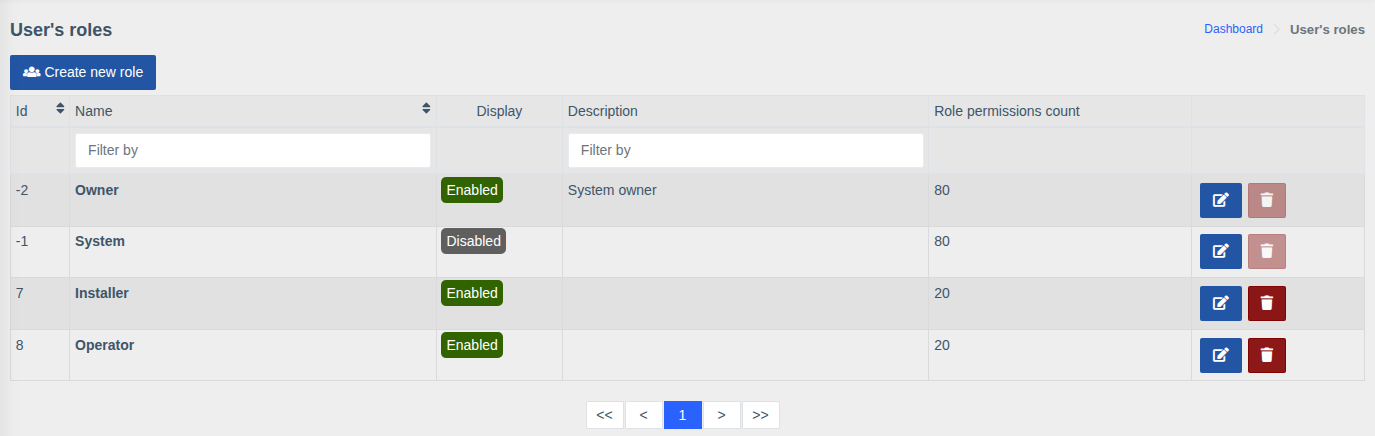
The list shows the name, description, display flag and number of permissions of each role.
Built-in roles➧
| Role | Description |
|---|---|
| Owner | System owner — has all permissions. Can't be edited or deleted |
| System | Internal system role, hidden (not shown when choosing a role) |
You create the other roles (e.g. "Operator", "Installer") yourself.
Creating and editing a role➧
Click "Create new role" or the edit button next to an existing one.
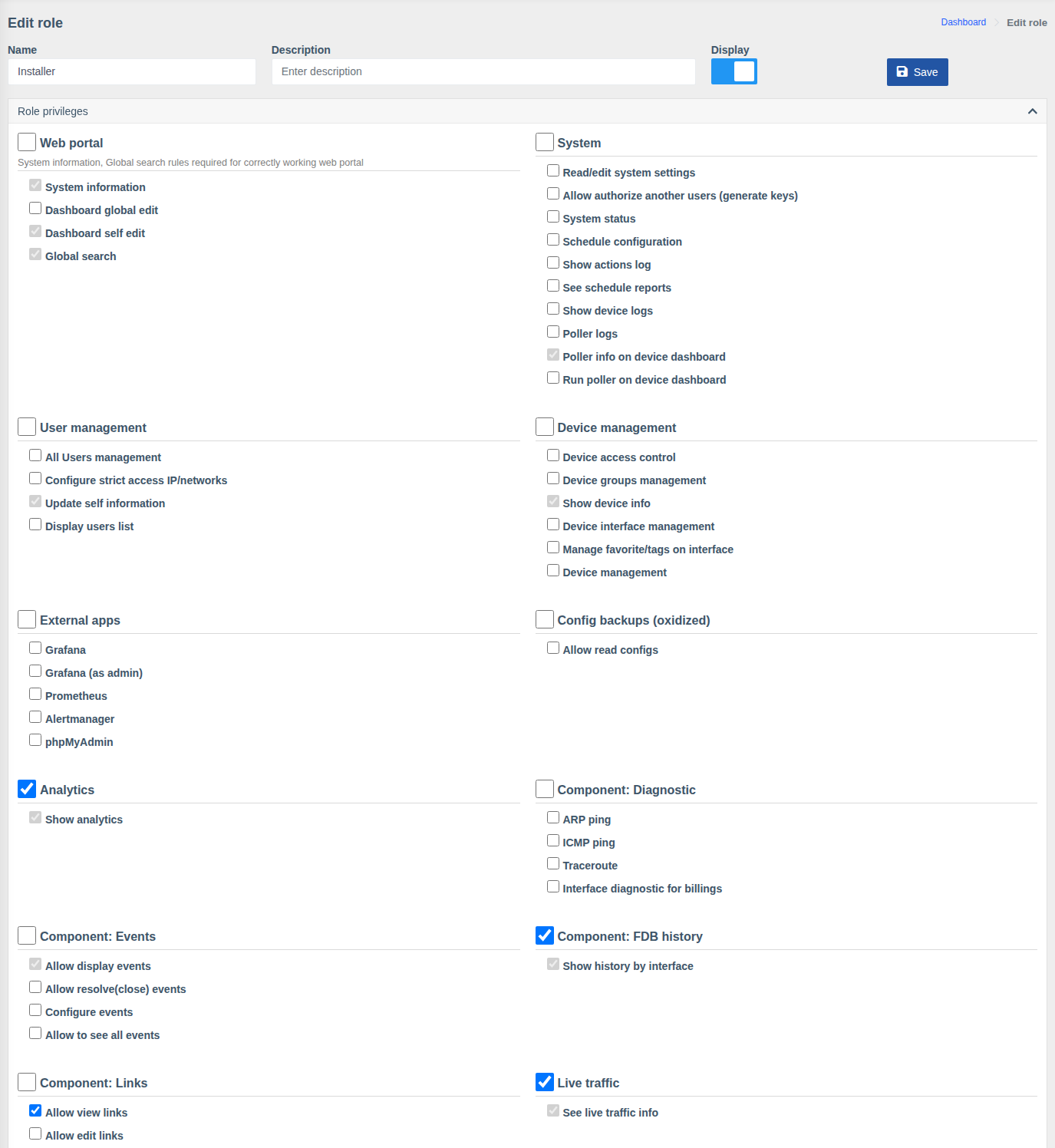
| Field | Description |
|---|---|
| Name | Role name |
| Description | Free-form comment |
| Display | Whether the role is shown in the list when assigning it to a user |
| SSO groups mapping | Shown when SSO sign-in is enabled. See Single Sign-On → Roles |
Below is the Role privileges block: permissions grouped by section. The checkbox next to a group name toggles all permissions of the group at once. Grey (inactive) checkboxes are basic permissions every role has. Click "Save" after making changes.
Permission groups➧
The set of groups depends on installed components. The main ones:
| Group | What it allows |
|---|---|
| Web portal | Access to the web interface, dashboard editing (own and global), global search |
| System | System settings, system status, scheduler and its reports, action log, device and poller logs, running the poller. "Allow authorize another users (generate keys)" — administrators only |
| User management | Managing users, allowed IPs, updating own information, viewing users, generating API keys |
| Device management | Viewing devices, managing devices, accesses, groups, interfaces, favorite interfaces/tags |
| External apps | Access to Grafana (also as admin), Prometheus, Alertmanager, phpMyAdmin |
| Analytics | The analytics section — for all devices regardless of groups |
| OLTs | OLT information; ONU actions: deregistration, reboot, clearing counters, reset, enable/disable, description; managing physical and UNI ports; ONU registration and its settings |
| Switches | Switch information; reboot, saving configuration, clearing counters; port description, state and speed; VLANs on ports |
| Component: Events | Viewing, resolving and configuring events, viewing all events |
| Component: Notifications | Full access, contact settings (own and others'), global notifications |
| Component: Macros | Running and editing macros |
| Component: Links | Viewing and editing links |
| Component: Diagnostic | ARP ping, ICMP ping, Traceroute, interface diagnostic for billings |
| Component: FDB history, Search devices | FDB history by interface and search in it; search by MAC/IP |
| Component: Prometheus | Charts: optical history, traffic, etc. |
| Live traffic | Real-time traffic view |
| Config backups (oxidized) | Viewing saved configurations |
| Attachments, QR generator, Sensors, RouterOS, Web console | Permissions of the corresponding components |
Role examples➧
| Role | Recommended permissions |
|---|---|
| Support operator | Web portal, Show device info, OLT/switch information, Charts, Allow display events, Diagnostic, Search devices |
| Installer | As operator + ONU registration, ONU reboot, ONU description editing, Running macros |
| Senior engineer | As installer + Port management, VLANs on ports, Device interface management, Allow edit links, Resolve events, Web console |
| Administrator | All groups, including System, User management and Device management |
Tip
With SSO sign-in the role can be assigned automatically from provider groups — see Single Sign-On.