ONU signal level history➧
Overview
Starting with version 0.31 WildcoreDMS remembers the minimum and maximum optical signal level of every ONU and the time of the last change. This shows whether the signal "floats" even if it's fine at the moment of viewing — e.g. because of a bad connector or a bent cable.
What is stored➧
For every ONU the system stores:
| Value | Description |
|---|---|
| RX | Signal level received by the ONU |
| TX | Signal level transmitted by the ONU |
| OLT RX | Signal level from the ONU received by the OLT |
For each value — the current value, minimum and maximum since the last reset, and the time of the last change. Values are updated by the poller (signal level polling) and when the ONU page is opened; a record is written only when the value actually changed.
Where to view➧
ONU card➧
ONU page → "Optical info" card → "Historical signal limits" block.
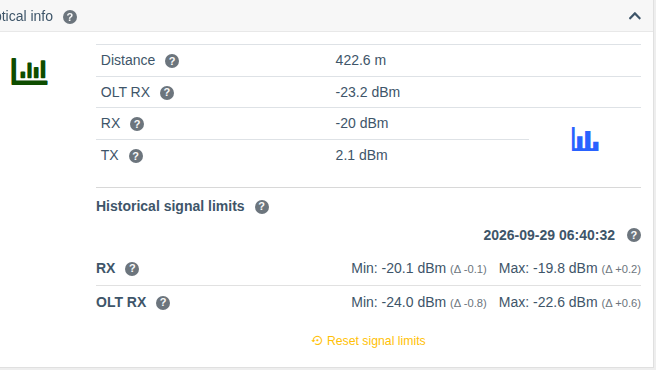
- date and time of the last signal change;
- for RX and OLT RX — Min and Max, and in brackets (Δ) how far the limit is from the current value;
- the "Reset signal limits" button sets the minimum and maximum to the current readings (with confirmation). Useful after a line repair to start observing anew.
ONU list➧
The ONU list (Interfaces > ONT list) supports sorting by OLT-side RX and has the
"Optical RX delta" column — the difference between the ONU RX and OLT RX levels. A large
difference may point to a line problem or to the ONU optics.
Reset via API➧
Limits can also be reset for all ONUs of a device at once — with the API methods
PUT /api/v1/ont-signal/reset/device/{id} and PUT /api/v1/ont-signal/reset/interface/{id},
see API.
Permissions➧
| Action | Permission |
|---|---|
| Viewing history | Show device info |
| Resetting limits | Device interface management |